
Six simple steps, from saving a place to getting back.
NAVIORA Individual follows the natural rhythm of a journey: remember where you are, keep the path you take, then choose how to return.
Walking only, for now
The current version of NAVIORA Individual supports walking journeys only. Saving places, recording your path, retracing it and the shortest walking route are designed and tested for travel on foot. Vehicle-based features, such as driving, are planned for a future version and are not available yet.
Step-by-step walkthrough
-
Open NAVIORA
Launch the NAVIORA application on your phone.
-
Save a place
Save or pin an important location you want to come back to.
-
Record a journey
Record a journey when required, so the path you take is kept.
-
Choose where to go
Select a saved location or one of your recorded routes.
-
Pick your way back
Choose to retrace your recorded walking path or take the shortest walking route.
-
Arrive
Follow the selected route to reach your destination.
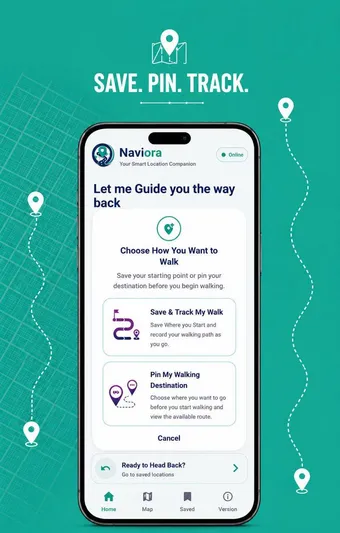
From the NAVIORA app
Good to know
Recording is up to you.
Save a place any time. Record a journey when you want to be able to retrace it. To follow your exact path back, that journey needs to have been recorded first.
- Save a place without recording
- Record when you want to retrace
- Retrace, or take the shortest route
Get started
Start with step one.
Download NAVIORA Individual, or ask us for a guided demo.